
3 Best Laptop Stands for MacBook to Fix Neck Pain in 2026
Reader-Supported: When you buy through links on our site, we may earn an affiliate commission. As an Amazon Associate, I earn from qualifying purchases. This supports our testing and editorial independence at no extra cost to you.
Do you love your MacBook but hate the neck pain that comes with it? You are not alone. Most MacBook users spend hours staring down at their screens. This bad posture leads to severe neck strain and “Tech Neck.”
I want to be honest with you: finding the best laptop stands for MacBook is not just about making your desk look cool. It is about saving your spine. By raising your screen to eye level, you force yourself to sit straight. It is a small change that makes a huge difference.
In 2026, there are hundreds of stands that claim to be “MacBook ready.” But most of them are made of cheap plastic or wobble when you type. You do not need to waste money on those. I have analyzed the market and selected the top 3 stands that truly match Apple’s quality.
Here is my honest, practical advice on which stand you should buy for your MacBook today.
Quick Summary: The “Cheat Sheet”
(If you are busy, here is the direct answer based on your needs)
| Category | Model | Rating | Best For | Key Feature |
| Best Overall | Rain Design mStand | ⭐⭐⭐⭐⭐ (4.8) | Fixed Desk Setup | Solid Aluminum Unibody Heatsink. |
| Best Aesthetic | Twelve South Curve | ⭐⭐⭐⭐⭐ (4.7) | Minimalist Setups | Sleek Matte Design with 70% Airflow. |
| Best for Travel | Roost V3 | ⭐⭐⭐⭐⭐ (4.9) | Digital Nomads | Ultra-light & Adjustable Height (6″-14″). |
How We Selected These Products (Our Criteria)
As a practical tech advisor, I don’t believe in recommending products just because they look nice. My selection process for MacBook stands is based on three strict rules:
- Design Harmony: The stand must match the MacBook’s premium aluminum finish.
- Thermal Performance: It must help cool the laptop (since MacBooks can get hot).
- Stability: It must not wobble, even with a heavy 16-inch MacBook Pro.
1. Rain Design mStand
Status: The Industry Standard.
Ideal For: Users who have a fixed desk and rarely move their setup.

If you walk into any creative agency or tech startup, you will see the Rain Design mStand on almost every desk. It has been the best-selling stand for Mac users for over a decade. Why? Because it is simple, and it works perfectly.
Why It Is My Top Pick
The mStand is made from a single, solid piece of thick aluminum. This “unibody” design means there are no hinges to break and no screws to tighten. It looks like it was made by Apple itself.
It raises your MacBook screen by about 5.9 inches. This is the perfect height to keep your head straight. Plus, the aluminum body acts as a giant heatsink. It absorbs heat from your MacBook and keeps it cool during heavy tasks like video editing.
My Honest Experience
- Stability: It is rock solid. You can type on your MacBook keyboard while it is on the stand, and it will not shake.
- Design: The sand-blasted finish matches the Silver and Space Gray MacBook Pro perfectly.
Key Specs:
- Material: Solid Anodized Aluminum.
- Elevation: 5.9 inches fixed height.
- Compatibility: Fits all MacBook Air and Pro models (13″ to 16″).
Pros & Cons
✅ The Good
- Zero wobble (extremely stable).
- Matches Apple design perfectly.
- Acts as a cooling pad (heatsink).
❌ The Bad
- You cannot adjust the height.
- It is heavy and not meant for travel.
Advisor Verdict: If you want a “buy it once, use it forever” stand for your home office, this is the best choice.

2. Twelve South Curve
Status: The Modern Art Piece.
Ideal For: Users who care about style and want a clean, minimalist desk.

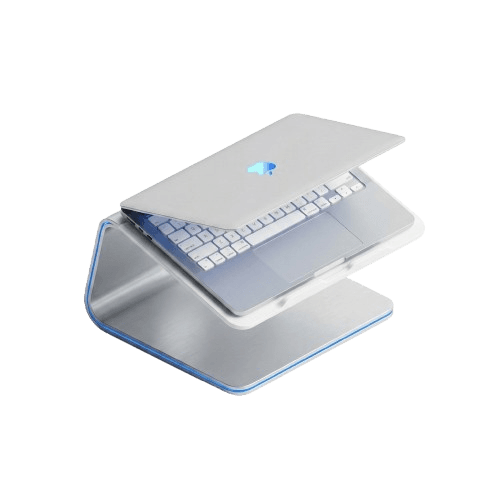
If the Rain Design mStand is an industrial tank, the Twelve South Curve is a modern sculpture. It is sleek, elegant, and looks beautiful even when your MacBook is not on it.
Why It Is Special
The Curve has a unique flowing design. It raises your MacBook 6 inches off the desk to improve ergonomics. The best part about this design is the airflow. Because the stand is mostly “open air,” 70% of your MacBook’s base is exposed. This allows for maximum cooling, which is critical for maintaining performance.
My Honest Experience
- The Look: It is available in Matte Black and White. The Matte Black version looks stunning with darker desk setups.
- Function: The rubber arms grip the MacBook gently but firmly, preventing any scratches.
Key Specs:
- Material: Matte Aluminum.
- Style: Minimalist, open-flow design.
- Cooling: Excellent airflow for fanless MacBook Airs.
Pros & Cons
✅ The Good
- Beautiful, modern design.
- Keeps the laptop very cool (70% airflow).
- Lightweight but stable.
❌ The Bad
- Non-adjustable fixed height.
- Slightly expensive for its simplicity.
Advisor Verdict: If you are building an “Instagram-worthy” desk setup, this is the stand you need.

3. Roost V3
Status: The Engineering Marvel.
Ideal For: Travelers, remote workers, and coffee shop hoppers.

Do you work from different places? Maybe a coffee shop today and a co-working space tomorrow? Then you cannot carry a heavy metal stand. You need the Roost V3.
Why It Is Different
The Roost V3 is widely considered the best portable laptop stand in the world. It weighs almost nothing (just 6 ounces) because it is made of glass-fiber reinforced nylon. But don’t let the weight fool you. It is incredibly strong.
It features a patented “Pivot Grip”. When you put your MacBook on it, the clips lock onto the front edge. You can literally tilt the stand back, and your MacBook will not fall off.
My Honest Experience
- Adjustability: Unlike the other two, this stand is height adjustable. You can raise your screen from 6 to 14 inches. This is huge for tall people.
- Portability: It folds up into a tiny stick that fits easily into any backpack pocket.
Key Specs:
- Material: Glass-Fiber Reinforced Nylon.
- Height: Adjustable (6″ to 14″).
- Weight: Ultra-light (6 oz).
Pros & Cons
✅ The Good
- Fits in your pocket (folds completely).
- Huge height range (great for tall users).
- Secure “Pivot Grip” prevents accidents.
❌ The Bad
- It is expensive for a plastic stand.
- Doesn’t look as premium as aluminum stands.
Advisor Verdict: If you travel with your MacBook, this is the only stand you should consider. It saves your neck anywhere you go.

Buying Guide: What Matters for MacBook Users?
You might be thinking, Can’t I just buy a cheap $15 stand? You can, but here is why you shouldn’t.
1. The “Scratch” Factor
MacBooks have delicate aluminum bodies. Cheap stands often use thin rubber pads that peel off. Once they peel, the metal stand rubs directly against your MacBook, causing permanent scratches35. The stands I recommended (Rain Design, Twelve South) use high-quality, thick silicone padding to protect your device36.
2. Thermal Throttling
MacBooks dissipate heat through their aluminum chassis. If you use a plastic stand or a stand with no airflow, that heat gets trapped. This slows down your laptop (throttling). Always choose a stand with an open design or aluminum body to act as a heatsink37.
3. The Wobble Test
If you plan to type on your MacBook keyboard while it is on the stand (which I don’t recommend, but people do it), you need stability. The Rain Design mStand is the king of stability38. Cheap adjustable stands often shake with every keystroke, which is very annoying.
Final Verdict: Which One Should You Buy?
Let’s make this simple.
- For the Home Office: Buy the Rain Design mStand. It is solid, matches your Mac, and lasts forever.
- For Style & Cooling: Buy the Twelve South Curve. It looks amazing and keeps your Mac cool.
- For Travel: Buy the Roost V3. It is the ultimate portable tool for digital nomads.
Your MacBook is a premium device. It deserves a stand that is safe, stable, and ergonomic. Invest in one of these, and your neck will thank you.