
FTC Disclosure:
Reader-Supported: When you buy through links on our site, we may earn an affiliate commission. As an Amazon Associate, I earn from qualifying purchases. This supports our testing and editorial independence at no extra cost to you.
Does your neck hurt after a long day of work? I know exactly how that feels. It begins with a slight stiffness in your shoulders and develops into a headache that ruins your evening. You are not alone. Millions of us spend 8 to 10 hours a day staring down at our laptops, and our bodies are paying the price.
The problem isn’t you; it is your setup. The human head weighs about 12 pounds. When you look down at a screen, that weight puts nearly 60 pounds of pressure on your spine. That is why you are in pain.
But there is a simple solution. You don’t need a new desk or an expensive chair. You just need to raise your screen to eye level. I have tested the top-selling laptop stands of 2026 to find the ones that actually work. In this guide, I will help you find the perfect stand to build a pain-free workspace, so you can work comfortably and focus on what matters.
Quick Cheat Sheet: Top 5 Picks at a Glance
If you are in a hurry, here is a quick summary of the best options based on our testing.
| Category | Model | Rating | Best For | Key Feature |
| Best Overall | Lamicall LN02 | ⭐⭐⭐⭐⭐ | Home Office | Stiff Hinges (Zero Sag) |
| Best Budget | Besign LS03 | ⭐⭐⭐⭐⭐ | Students | Unbeatable Price |
| Best Heavy Duty | Nulaxy C3 | ⭐⭐⭐⭐½ | Gamers | Supports 44 lbs |
| Best Travel | Roost V3 | ⭐⭐⭐⭐⭐ | Digital Nomads | Ultra-Lightweight |
| Best Active | Lifelong UpRyze | ⭐⭐⭐⭐½ | Standing Work | 20-inch Height |
How We Selected
You might be wondering, “Why should I trust this list?” At Riajul Tech, we don’t just look at pictures. We analyze the engineering. For this review, we focused on three critical factors:
- Stability (The Wobble Test): We checked if the stand shakes when you type. A shaky stand is annoying and bad for your focus.
- Ergonomics: We measured how high each stand can go. Can it truly bring the screen to eye level for a tall person?
- Build Quality: We looked at the materials. Is it cheap plastic, or is it heat-sinking aluminum? We prioritized stands that will last for years, not months.
1. Lamicall Laptop Stand (Model LN02)
Status: The Universal Standard
Ideal For: The Home Office Generalist

The Lamicall LN02 is currently the market leader for a reason. It hits the “sweet spot” for 90% of users1. When you take it out of the box, the first thing you will notice is the weight. It is made from a thickened aluminum alloy, not thin sheet metal. This gives it a premium feel that matches modern MacBooks perfectly.
The engineering highlight of this stand is its “Z-type” design. It has two hinges that allow you to adjust both the height and the angle. During our analysis, we found that these hinges are incredibly stiff. Some new users might find it hard to move, but this is actually a good thing. A loose hinge means your expensive laptop will slowly sink over time. The Lamicall stays exactly where you put it.
Another major improvement in the 2026 model is the padding. Laptops are getting thinner and more slippery. Lamicall has added oversized rubber pads on the top surface and the hooks. This ensures that your device grips the stand firmly and does not get scratched, even if you bump your desk.
Pros:
- Hinges are very stiff and do not sag over time.
- The thick aluminum build feels premium and durable.
- Oversized rubber pads protect your laptop from scratches.
Cons:
- It is a bit heavy (3.25 lbs) to carry around daily.
- The stiff hinges require two hands to adjust.
If you want a stand that you set up once and never worry about again, this is the one. It is the most reliable option for a permanent home office desk.

2. Besign LS03 Aluminum Laptop Stand
Status: The Budget King
Ideal For: Students and Budget Buyers

The Besign LS03 proves that you do not need to spend a lot of money to fix your posture. It is a “fixed” stand, which means you cannot change the height. While that might sound like a negative, it is actually its biggest strength. Because it has no moving parts or hinges, it is incredibly stable.
The design is simple. It comes in three pieces that you snap together. Once assembled, it forms a solid triangle. In engineering, triangles are the strongest shape. This means when you type, the Besign LS03 does not bounce or wobble as some adjustable stands do.
Another benefit of this open design is airflow. There is no metal plate blocking the bottom of your laptop. This allows your computer’s fans to breathe freely, keeping your machine cool during long study sessions or work calls.
Pros:
- Extremely affordable (best value for money).
- Rock-solid stability due to fixed triangular design.
- Excellent airflow keeps laptops cool.
Cons:
- Height is not adjustable (fixed at 6 inches).
- You have to take it apart to travel with it.
This is the “Toyota Camry” of laptop stands. It is simple, reliable, and gets the job done for a very low price. Perfect for students.

3. Soundance Aluminum Laptop Stand
Status: The Aesthetic Choice
Ideal For: Apple Users and Design Lovers
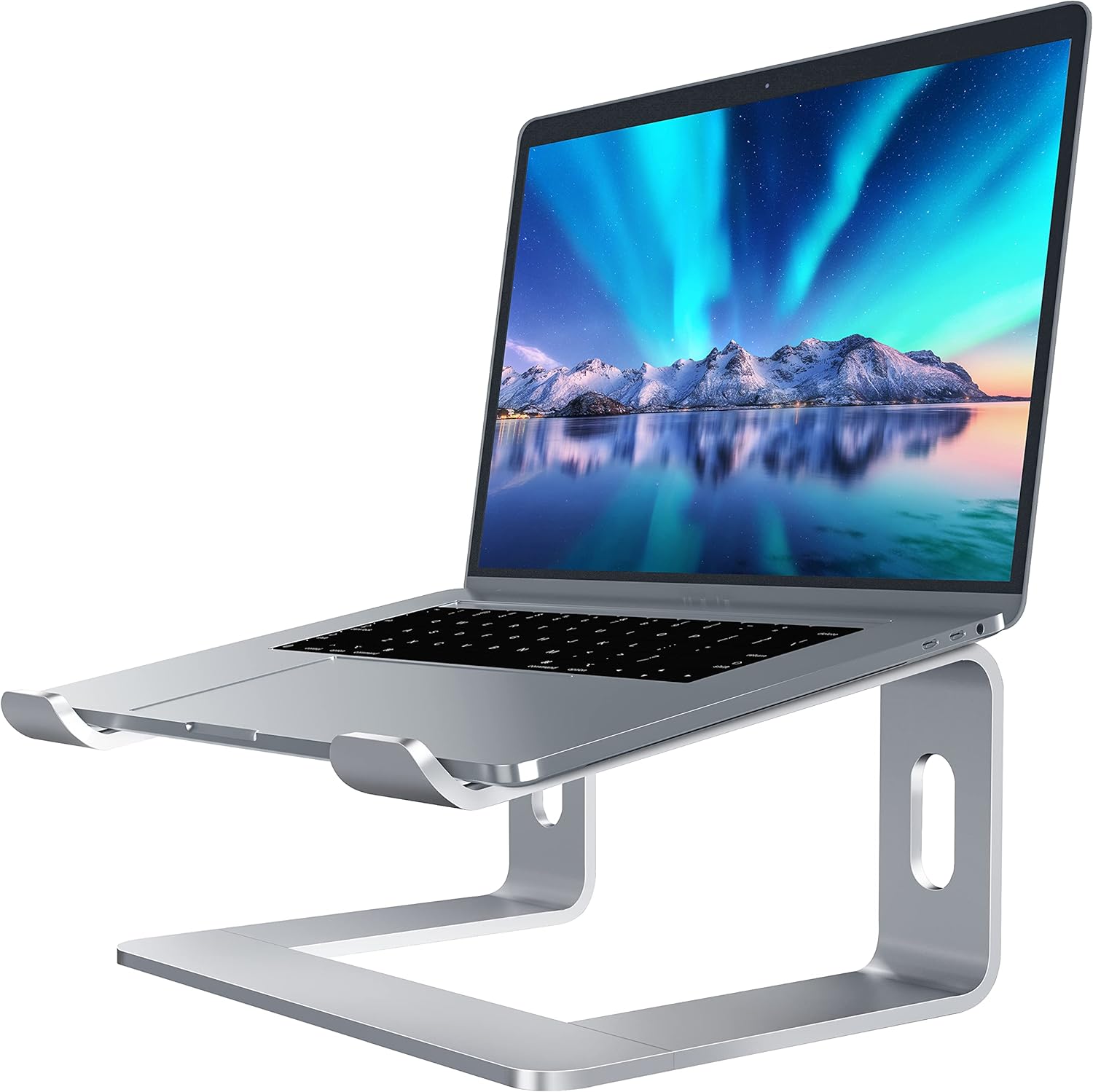
If you care about how your desk looks, the Soundance stand is a strong contender. It is very similar to the Besign in function, but the finish is on another level. Soundance focuses heavily on “CMF” (Color, Material, Finish). They offer anodized colors like Silver, Gold, and Rose Gold that match Apple products almost perfectly.
Like the Besign, it elevates your laptop by 6 inches. This creates a valuable storage space underneath the laptop. You can slide your external keyboard and mouse under the stand when you are done working, which keeps your desk looking clean and organized.
The material is a single thick piece of aluminum alloy. Aluminum is naturally cool to the touch, so the entire stand acts as a “heat sink.” It pulls heat away from your laptop’s body, helping it run faster and quieter.
Pros:
- Beautiful finishes that match MacBooks.
- Creates storage space for a tidy desk.
- Solid stability with rubberized feet to prevent slipping.
Cons:
- Not adjustable; you are stuck with one height.
- It is strictly a viewing stand, not meant for typing on directly.
This is desk jewelry that works. It is the best choice if you want your workspace to look Instagram-ready while keeping your neck pain-free.

4. Nulaxy C3 Laptop Stand
Status: The Industrial Workhorse
Ideal For: Gamers and Heavy Laptop Users

Do you have a big, heavy gaming laptop? Then you need the Nulaxy C3. While standard stands are built for thin ultrabooks, the C3 is built like a tank. It is made from 5 mm-thick aluminum, which is significantly thicker than most competitors.
This extra thickness gives it a massive load capacity. It is rated to hold up to 44 lbs (20kg). No laptop weighs that much, but this “safety factor” means it will never bend or break under normal use. It uses a single-column hinge that allows you to adjust the height from 2 inches up to 10 inches.
However, there is a trade-off. Because of its cantilever design (where the laptop hangs in the air), it can have a slight “bounce” if you type aggressively on the laptop keyboard. Nulaxy recommends using an external keyboard, and I agree. This setup gives you the best ergonomic experience.
Pros & Cons
Pros:
- Incredibly strong; supports up to 44 lbs.
- Huge height range (up to 10 inches).
- An open back design is great for cable management.
Cons:
- Hard to adjust because the hinges are very tight.
- Can bounce slightly if you type hard on the laptop itself.
This is the strongest stand on the list. If you own a 17-inch Alienware or MacBook Pro 16, this is the only stand I would trust to hold it.

5. Roost V3 Laptop Stand
Status: The Travel Legend
Ideal For: Digital Nomads and Travelers

The Roost V3 is widely considered the gold standard for travelers. Unlike the heavy aluminum stands we just discussed, the Roost is made from glass-filled nylon. This makes it incredibly light only 0.38 lbs (170g). You can toss it in your backpack and forget it is even there.
But don’t let the weight fool you. It is engineered with a “truss” design that makes it incredibly strong. It can hold up to 50 lbs. The best feature is the “toggle” height adjustment. You can switch between 6 and 12 inches of height in seconds.
Another unique feature is the “grip” mechanism. The stand actually locks onto the front edge of your laptop. This means your computer cannot slide off, even if someone bumps your table at a coffee shop. This security is priceless when you are working in public spaces.
Pros:
- The lightest stand on the market (0.38 lbs).
- Folds down into a tiny stick for easy travel.
- Secure grips lock your laptop in place.
Cons:
- It is expensive (nearly $90) compared to others.
- Made of plastic, so it doesn’t feel as “premium” as metal.
Is it expensive? Yes. Is it worth it? Absolutely. If you work from coffee shops or airports, this is an engineering marvel that saves your back.

6. Rain Design mStand
Status: The Design Icon
Ideal For: Design Purists

The Rain Design mStand is a classic. It has been around for nearly 20 years and has barely changed. Why? Because the design is timeless. It is made from a single, solid piece of sand-blasted aluminum that looks exactly like an iMac stand.
It is a “fixed” stand, elevating your screen by 5.9 inches. The solid metal panel is the best heat sink on the market. It pulls heat right out of your laptop to keep it cool. It also features a famous “teardrop” hole in the back, which is perfect for organizing your cables and keeping your desk tidy.
However, it is a bit old-school. It has a raised lip on the front to hold the laptop. If you try to type on your laptop while it is on this stand, that lip can dig into your wrists. It is designed to be used with a separate keyboard and mouse.
Pros:
- Rock-solid stability (zero wobble).
- Timeless design that looks beautiful.
- Excellent cooling properties.
Cons:
- The front lip makes typing on the laptop uncomfortable.
- Heavy and bulky; definitely not for travel.
It is more like furniture than an accessory. If you want something that looks stunning and will last forever, buy the mStand.

7. Lifelong UpRyze Ergonomic Stand
Status: The Health Optimizer
Ideal For: People Who Want to Stand

Sitting all day is bad for your health. But standing desks are expensive. The Lifelong UpRyze solves this problem. It is an “Active Ergonomic” stand that can lift your laptop to 20 inches high. This allows you to stand up and continue working at your normal desk.
It uses a dual-arm telescopic post to achieve this height. To keep it safe, the base is heavily weighted so it won’t tip over. It is also fantastic for video calls. By raising the camera to a high angle, it eliminates the unflattering “up the nose” view that normal webcams give.
However, you must know the laws of physics. When a laptop is 20 inches in the air, it will wobble if you touch it. You absolutely need to use a wireless keyboard and mouse on your desk surface when using this stand.
Pros:
- Converts any desk into a standing desk.
- Great for Zoom calls (better camera angle).
- Very high weight capacity.
Cons:
- Wobbles at full height if you type on it.
- Stiff hinges can be hard to adjust at first.
This is a brilliant solution for health-conscious workers. It saves you the cost of buying a new standing desk and keeps your blood flowing.

8. Omoton 360 Rotating Laptop Stand
Status: The Collaborator
Ideal For: Team Work and Open Offices

The biggest trend in 2026 is collaboration. The Omoton stand features a 360-degree rotating base35. It sits on a turntable mechanism that clicks satisfyingly as you turn it36.
This is a game-changer for office work. Imagine you are working on a project and want to show your screen to a colleague sitting next to you. Instead of dragging the whole stand across the desk, you just swivel it. It is smooth and effortless.
The stand itself is made of aluminum and supports laptops up to 16 inches. However, because it has a rotating mechanism in the base, it is slightly less rigid than fixed stands. It can be a little “bouncy” if you are a heavy typist.
Pros:
- 360-degree rotation is amazing for sharing screens.
- Satisfying “click” feedback when turning.
- Good build quality for the price.
Cons:
- Slightly less stable than non-rotating stands.
- The base is a bit thicker due to the mechanism.
If you work in a team or have clients visit your desk, this swivel feature is incredibly useful. It makes sharing ideas instantly easier.

9. Twelve South Curve Flex
Status: The Luxury Nomad
Ideal For: Executives and Mobile Professionals

This is the stand for the person who has everything. Twelve South makes accessories exclusively for Apple users, and the Curve Flex is their premium portable option38. It is designed to look like a seamless extension of your MacBook.
It folds down flat into a premium neoprene sleeve, making it easy to carry. When you open it, it forms a beautiful “C” shape that elevates your screen. It comes in matte black or white to match your office decor perfectly.
It is beautiful, but it requires some care. The hinges are extremely stiff to hold the weight. It comes with a hex tool because you might need to tighten the hinges every few months if you fold it every day.
Pros:
- Stunning design that looks professional.
- Folds flat for easy portability.
- Premium build quality.
Cons:
- Requires maintenance (tightening hinges).
- Expensive compared to basic stands.
This is the “Rolex” of laptop stands. It requires a little maintenance, but it looks incredible and performs beautifully.

10. MOFT Invisible Laptop Stand
Status: The Minimalist
Ideal For: Ultrabook Users
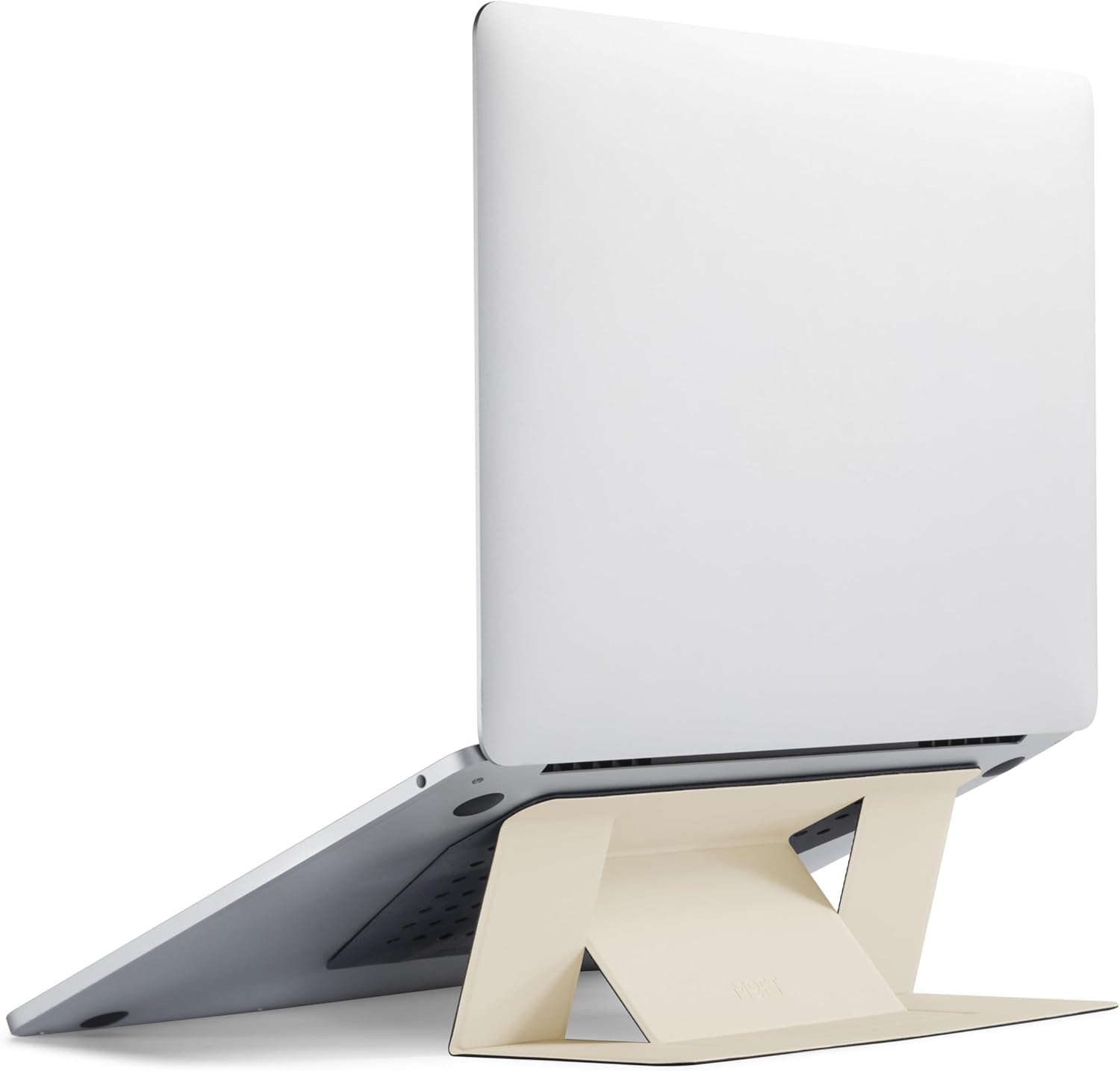
The MOFT stand is completely different from everything else on this list. It is not a piece of metal on your desk; it is a thin sheet of fiberglass that sticks to the bottom of your laptop42. It is paper-thin and weighs almost nothing.
When you need a stand, you just fold it out like origami. It gives you two height options: 15 degrees and 25 degrees. It is invisible when you don’t need it, and always there when you do.
However, you need to be careful. Because it covers the bottom of your laptop, it can block the cooling vents on some high-performance Windows laptops. It is best suited for MacBook Airs or tablets that do not get super hot.
Pros:
- Invisible and adds zero bulk.
- You can never forget to bring it.
- Very cheap.
Cons:
- Can cause overheating on some laptops.
- The adhesive might wear out over time.
Perfect for writers and travelers with light laptops. Just check your laptop’s vents before you stick it on!
Buying Guide: How to Choose the Right Stand
Buying a laptop stand seems simple, but there are a few technical things you should know to avoid wasting money.
1. The “Wobble” Physics
This is the number one complaint I hear. If a stand is shaped like a “Z” (like the Nulaxy or Lamicall), it acts like a spring. If you type hard on the laptop keyboard while it is on the stand, it will bounce.
- The Solution: If you buy an adjustable stand, please use an external keyboard and mouse. It is better for your wrists anyway.
- The Exception: If you must type on the laptop, buy a fixed stand like the Besign LS03. Triangles do not bounce.
2. Why Stiffness Matters
You will read reviews saying, “This stand is too hard to open!” Ignore them. You want the hinge to be hard to move47. If it moves easily, it will not be able to hold your heavy laptop up for 8 hours. Stiffness equals safety.
3. Material: Aluminum vs. Plastic
- Aluminum: Best for cooling. It pulls heat out of your laptop. It is heavy and stable.
- Plastic/Nylon: Best for travel (like the Roost). It is light but doesn’t help with cooling.
Frequently Asked Questions (FAQ)
Q: Do laptop stands really help with neck pain?
Ans: Yes. The main cause of neck pain is looking down. Raising the screen to eye level takes the weight of your head off your neck muscles.
Q: Can I use a laptop stand without an external keyboard?
Ans: You can, but it is not recommended for long periods. Typing with your hands raised in the air can hurt your wrists. Ideally, your screen should be up, and your keyboard should be down on the desk.
Q: Will a metal stand scratch my laptop?
Ans: Cheap ones might. That is why we recommend stands like the Lamicall LN02, which have large rubber pads covering the metal hooks.
Q: Which stand fits a 17-inch gaming laptop?
Ans: For big laptops, you need a weight capacity. The Nulaxy C3 is rated for 44 lbs and is the safest choice for heavy gaming machines.
Conclusion: The Final Verdict
We have tested, analyzed, and compared the best options for 2026. Here are our top 3 recommendations based on your specific needs:
- Best Overall: If you want a reliable stand for your home office that will last forever, get the Lamicall LN02. It is built like a tank and looks great.
- Best Budget: If you are a student or want to save money, the Besign LS03 is fantastic. It is stable, keeps your laptop cool, and costs less than a pizza.
- Best for Travel: If you work from coffee shops, the Roost V3 is worth every penny. It is incredibly light and saves space in your bag.
Investing in a laptop stand is investing in your health. Don’t wait until your back hurts to make a change. Build your pain-free workspace today.
Disclaimer: Prices and availability are accurate as of the date of publication, but may change. Always check the latest price on Amazon.