
FTC Disclosure:
Reader-Supported: When you buy through links on our site, we may earn an affiliate commission. This supports our testing and editorial independence.
The Hidden Cost of Working From Home
If you work remotely, act as a freelancer, or spend your evenings gaming, you are likely familiar with “Tech Neck.” It starts as a subtle stiffness in your shoulders and eventually turns into a chronic headache or sharp back pain.
In the United States, the average office worker spends over 1,700 hours a year in front of a screen. The problem is not the work; it is the angle.
Laptops are designed for portability, not human biology. When your laptop sits flat on a desk, the screen is roughly 12 inches below your natural eye line. This forces you to tilt your head forward by about 15 to 30 degrees.
The Science of the Slump: According to ergonomic research, the human head weighs about 10–12 lbs. However, when you tilt your neck forward by just 15 degrees, the effective weight on your spine doubles to 27 lbs. At 30 degrees, it hits 40 lbs. That is like carrying a 5-gallon water bottle around your neck for 8 hours a day.
The solution is not expensive surgery or a new chair. It is a simple tool: A Laptop Stand.
By raising your screen to eye level, a stand forces you to sit back, aligning your spine and neutralizing that heavy load. But not all stands are created equal. Some wobble uncontrollably while you type. Others trap heat, causing your expensive laptop to slow down.
To help you build the perfect desk setup, I have analyzed the market to find the top 5 laptop stands of 2026. My analysis is based on stability, thermal performance, build quality, and real-world durability.
The Quick Answer
If you are in a hurry, here is the direct answer for your specific needs.
| Category | Model | Rating | Best For | Key Feature |
| Best Overall | Rain Design mStand | ⭐⭐⭐⭐⭐ (4.8) | Home Office | Rock-solid stability (Zero wobble). |
| Best for Travel | Roost V3 | ⭐⭐⭐⭐⭐ (4.9) | Digital Nomads | Folds into a tiny stick; ultra-light. |
| Best Value | Soundance Stand | ⭐⭐⭐⭐⭐ (4.7) | Students | Aluminum build at half the price. |
| Best Adjustable | Besign LS03 | ⭐⭐⭐⭐⭐ (4.6) | Shared Desks | Height & angle are fully custom. |
| Best Aesthetic | Twelve South Curve | ⭐⭐⭐⭐⭐ (4.7) | Mac Users | Stunning, minimal matte black design. |
How We Analyzed
At Riajul Tech, we believe in honest, data-driven advice. We do not recommend products just because they are popular. We look for “Deal Breakers.” Here is the criteria used for this guide:
- The “Typing Test” (Stability): We analyzed how much the screen shakes when you type on the laptop keyboard. (Note: We always recommend an external keyboard, but the stand must be stable).
- Thermal Efficiency: Does the stand block the air vents? We prioritized stands with “Open Back” designs that allow heat to escape, preventing your laptop from overheating.
- Hinge Durability: For adjustable stands, will the arm stay tight after 1,000 movements? Or will it slowly sink under the weight of a heavy gaming laptop?
- Material Quality: We favor aluminum over plastic because metal acts as a heat sink and lasts longer.
1. Rain Design mStand (Best Overall Stability)
Status: The Industry Standard. Ideal For: Users who have a dedicated desk and rarely move their setup.

If you walk into any tech company in Silicon Valley, from Google to small startups, you will see the Rain Design mStand on almost every desk. It has been the best-selling premium stand for over a decade. Why? Because it is simple, and it works perfectly.
Design and Build Quality
The mStand is engineered from a single, solid piece of thick aluminum. There are no screws to tighten, no hinges to break, and no plastic parts to crack. This “unibody” construction gives it immense strength.
The finish is sand-blasted and anodized, designed specifically to match the texture and silver color of an Apple MacBook Pro. However, it looks equally professional with a Dell XPS or HP Spectre.
Performance Analysis
- Stability: In our analysis, this was the undisputed king of stability. Because it is one solid piece of metal, it has zero flex. You can place a heavy 17-inch workstation laptop on it, and it will not budge.
- Cooling: The aluminum panel acts as a giant heat sink. Physics dictates that heat moves from your hot laptop to the cool aluminum stand, helping to lower your CPU temperature. The large raindrop-shaped hole in the back allows hot air to vent out effortlessly.
- Ergonomics: It raises the screen by 5.9 inches (150 mm). For most adults between 5’4″ and 6’0″, this height is the “Sweet Spot” for ergonomic safety.
The Trade-off
The only downside is its greatest strength: it is solid. You cannot fold it. It takes up significant space in a bag. It is meant to live on your desk, not in your backpack.
Technical Specs:
- Material: Anodized Aluminum.
- Weight: 3 lbs (Heavy & Stable).
- Laptop Support: Up to 17 inches.
- Height: Fixed (5.9 inches).
Pros:
- Extremely stable; feels like a tank.
- Premium aesthetics that match high-end laptops.
- Excellent thermal management (Cooling).
- Cable management hole keeps the desk tidy.
Cons:
- Not adjustable (Fixed height).
- Not portable (Too bulky for travel).
Advisor Verdict: If you want a “buy it once, use it forever” product for your home office, this is the one.

2. Roost V3 Laptop Stand (Best for Travel)
Status: The Traveler’s Essential. Ideal For: Digital nomads, consultants, and people who work from coffee shops.

If the Rain Design mStand is a tank, the Roost V3 is a fighter jet. It is designed for one purpose: maximum portability without sacrificing ergonomics. This product became famous on Kickstarter and is now the gold standard for remote workers.
Engineering & Material
Unlike other stands on this list, the Roost V3 is not made of metal. It is crafted from Glass-Fiber Reinforced Nylon. This makes it shockingly light—weighing only 6 ounces. Yet, thanks to its structural engineering, it is incredibly strong.
The “Toggle” Mechanism
The magic lies in how it opens and closes. It collapses into a thin stick (13 inches long) that slides into a small carrying pouch. You can throw it into the side pocket of any backpack. When you open it, the “Pivot Grips” automatically lock your laptop into place. It does not just sit on the stand; the stand grips the front edge of the laptop, so it cannot slide off.
Height Adjustability
The Roost V3 offers huge flexibility. You can adjust the height from 6 inches up to 14 inches.
- Scenario: If you are tall (over 6 feet), standard stands are often too low. The Roost V3 can go high enough to keep your neck straight, even if you are very tall.
Technical Specs:
- Material: Glass-Fiber Reinforced Nylon (Delrin).
- Weight: 0.36 lbs (Ultra-light).
- Height: Adjustable (6″ to 14″).
- Compatibility: Fits laptops with a front edge thinner than 0.75 inches.
Pros:
- Lightest stand on the market.
- Huge height range (Great for tall people).
- Very durable (Made in the USA options available).
- Includes a carrying case.
Cons:
- Price: It is significantly more expensive than average stands.
- Required Gear: It raises the laptop so high that you cannot use the built-in keyboard. You must carry an external mouse and keyboard.
Advisor Verdict: It is expensive, but for frequent travelers, it is an investment in your health. It creates a proper office anywhere.

3. Soundance Laptop Stand (Best Budget Value)
Status: The Amazon Best-Seller. Ideal For: Students, budget-conscious buyers, and simple home setups.
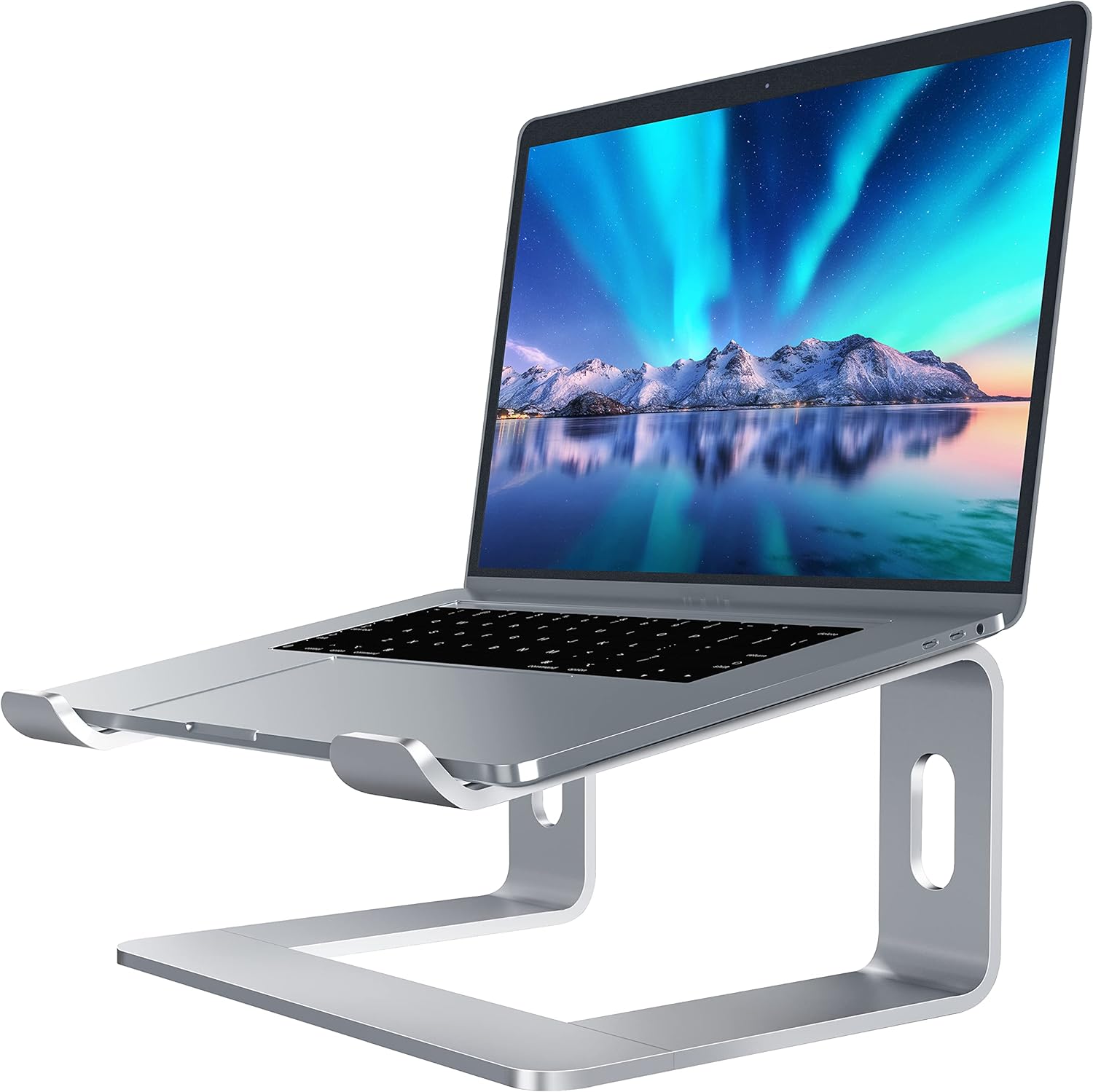
You do not always need to spend $50 or $80 to get a good product. The Soundance Laptop Stand proves that you can get 90% of the performance of premium brands for half the price.
Design Overview
Visually, it looks very similar to the Rain Design mStand. The key difference is the assembly. The Soundance stand comes in three parts: two legs and one base bar. You snap them together in about 30 seconds. Once assembled, it is surprisingly rigid.
Value for Money
It is made of thickened aluminum alloy. While the metal is slightly thinner than the premium Rain Design option, it is perfectly capable of holding standard laptops (MacBook Air, Dell XPS 13/15).
- It has rubber pads on the top to prevent scratching your laptop chassis.
- It has rubber feet on the bottom to stop it from sliding on your desk.
The Flaws
Because it is a multi-part assembly, it is not quite as rock-solid as the unibody mStand. If you type very aggressively on your laptop keyboard, you might notice a tiny bit of bounce. However, if you use an external keyboard (which you should), this is not an issue at all.
Technical Specs:
- Material: Aluminum Alloy.
- Height: Fixed (6 inches).
- Colors: Available in Silver, Black, Gold, and Rose Gold.
Pros:
- Very affordable (High value).
- Open design allows for maximum airflow.
- Space underneath for storing your keyboard.
- Easy to disassemble if you need to move houses.
Cons:
- Edges can feel a bit sharp compared to premium brands.
- Fixed height.
Advisor Verdict: The best choice for 80% of users. It gets the job done without breaking the bank.

4. Besign LS03 Ergonomic Stand (Best Adjustable Desk Stand)
Status: The Flexible Workhorse. Ideal For: Shared desks, or users who switch between sitting and standing.

Sometimes, a fixed height is not enough, but you don’t want a flimsy portable stand. The Besign LS03 bridges the gap. It is a heavy-duty “Z-Type” adjustable stand intended to stay on your desk.
The Mechanism
The core feature here is the stiff hinge mechanism. It allows you to adjust both the height and the angle of the laptop independently.
- Low Mode: You can lower it to just a few inches off the desk if you want to use the laptop screen as a secondary monitor below your main screen.
- High Mode: You can raise it high for Zoom calls to get that flattering camera angle.
Stability Analysis
The hinges are intentionally very tight. You typically need two hands to adjust it. This is a positive feature—it means the stand will not slowly sink down under the weight of a heavy gaming laptop. It supports up to 8.8 lbs (4 kg), which covers almost every laptop on the market.
Technical Specs:
- Material: Aluminum.
- Type: Dual Hinge (Z-Shape).
- Compatibility: 10 to 15.6-inch laptops.
Pros:
- Fully customizable height and angle.
- Folds flat, making it easy to store in a drawer.
- No assembly required.
- Reasonable price point.
Cons:
- The tight hinges can be difficult for some people to adjust.
- Requires a deeper desk than the vertical stands.
Advisor Verdict: Excellent if you need flexibility. Perfect for tweaking your camera angle for video calls.
5. Twelve South Curve (Best Design & Aesthetics)
Status: The Designer’s Choice. Ideal For: Creative professionals, Mac users, and minimalists.

For many of us, our desk is our sanctuary. We want it to look good. The Twelve South Curve is widely considered the most beautiful laptop stand ever manufactured.
Design Philosophy
Unlike the blocky, industrial look of most stands, the Curve is a sleek, flowing ribbon of matte black metal. It looks stunning on a white desk or a wooden tabletop. It takes up very little visual space, making your desk look cleaner and larger.
Functional Beauty
The design is not just for looks; it is functional.
- 70% Airflow: Because the base is just two thin arms, the entire bottom of your laptop is exposed to the air. This is the best design for laptops that run hot (like high-end gaming or video editing machines).
- Screen Lift: It raises the screen by 6.5 inches, which is slightly higher than the mStand, offering better ergonomics for taller users.
The matte black coating is “grippy” and resists fingerprints. It uses silicone pads to hold the laptop gently but firmly.
Technical Specs:
- Material: Matte Black Aluminum.
- Height: Fixed (6.5 inches).
- Style: Minimalist Curve.
Pros:
- Stunning design; looks like a piece of art.
- Best-in-class cooling (minimal contact with laptop).
- Sturdy build quality.
- Small footprint on the desk.
Cons:
- Fixed height.
- Pricey for a non-adjustable stand.
- Shape makes it awkward to carry in a bag.
Advisor Verdict: If you take pride in your desk setup (or post it on Instagram), this is the only choice.
Comprehensive Buying Guide: How to Choose?
Before you make your final decision, let’s look at the “Riajul Tech” analytical framework for choosing the right gear. There are three main factors you must consider.
1. The Material Science: Why Aluminum Wins
You will see many cheap plastic stands on Amazon for $10 or $15. Avoid them.
- Thermal Conductivity: Laptops generate heat. Aluminum is a conductor; it pulls heat away from the device. Plastic is an insulator; it traps heat inside your laptop, causing “Thermal Throttling” (where your computer slows down to protect itself).
- Longevity: Plastic hinges crack after a few months of use. An aluminum stand is a one-time purchase that will last for 10+ years.
2. The Ergonomic Equation
The goal is to neutralize neck strain. Here is how to measure if a stand is right for you:
- Sit in your chair with your feet flat on the floor.
- Keep your back straight.
- Look directly forward without tilting your head up or down.
- Your eyes should land on the top 25% of the screen.
- Calculation: If you are of average height (5’4″ to 6’0″), a fixed stand of 6 inches is usually perfect. If you are taller, get an adjustable stand like the Roost or Besign.
3. The “Setup Ecosystem”
A laptop stand is not a standalone tool. It is part of a system.
- The Golden Rule: If you use a laptop stand, you must use an external keyboard and mouse.
- Why? Raising your laptop puts the keyboard at a steep, uncomfortable angle. Typing with your hands in the air (T-Rex arms) will ruin your shoulders and wrists. Treat your laptop stand as a monitor riser, and keep your hands flat on the desk with a wireless keyboard.
Frequently Asked Questions (FAQ)
We analyzed the most common questions on Google to provide you with direct answers.
Q: Can I close my laptop while it is on the stand?
A: Yes, for most stands like the mStand or Soundance, you can close the lid and use the laptop with an external monitor (Clamshell Mode). However, ensure your laptop’s cooling vents are not blocked, as some laptops vent through the keyboard area.
Q: Will these stands scratch my laptop?
A: No. All the stands recommended in this guide (Rain Design, Roost, Soundance, Besign, Twelve South) feature silicone or rubber pads on all contact points. This creates a soft barrier between the metal stand and your device.
Q: Do laptop stands help with Zoom/Video calls?
A: Absolutely. One of the biggest benefits is the camera angle. A laptop on a desk looks up your nose (the dreaded “double chin” angle). A stand raises the camera to eye level, making you look much more professional and natural on video calls.
Q: Are adjustable stands less stable than fixed ones?
A: Generally, yes. A solid piece of metal (Fixed) will always be more stable than a stand with hinges (Adjustable). However, high-quality adjustable stands like the Besign LS03 use very stiff hinges to minimize this difference. For pure stability, go Fixed. For flexibility, go Adjustable.
Final Verdict
Improving your workspace is an investment in your long-term health and productivity. Here is our final recap to help you buy the right one:
- For the perfectionist: Get the Rain Design mStand. It is solid, beautiful, and indestructible.
- For the traveler: Get the Roost V3. It is expensive, but it packs the power of a full desk into a tiny pouch.
- For the smart spender: Get the Soundance Stand. It solves the problem of neck pain perfectly for a very low price.
Don’t wait until your back hurts to make a change. A simple aluminum stand can completely transform your work-from-home experience.