
Reader-Supported: When you buy through links on our site, we may earn an affiliate commission. As an Amazon Associate, I earn from qualifying purchases. This supports our testing and editorial independence at no extra cost to you.
Does your neck hurt after a long day of work? You are not the only one. Most of us spend hours hunched over our laptops, staring down at the screen. This bad posture leads to “Tech Neck,” shoulder pain, and fatigue.
I want to be honest with you: buying a laptop stand will not magically fix your life, but finding the best laptop stands for your desk setup is the single most practical step you can take to fix your posture. By raising your screen to eye level, you force yourself to sit up straight. It is a small change that makes a huge difference.
In 2026, the market is flooded with thousands of options. Some are overpriced, and some are flimsy junk. You do not need to stress about finding the right one. I have done the hard work for you. I analyzed the latest market data, bestseller lists, and real user feedback to find the top 5 laptop stands that are actually worth your money.
Here is my honest, practical advice on which stand you should buy today.
Quick Summary: The “Cheat Sheet”
(If you are busy, here is the direct answer based on your needs)
| Category | Model | Rating | Best For | Key Feature |
| Best Overall | Besign LS03 | ⭐⭐⭐⭐⭐ (4.8) | Home Office | Detachable & Rock-Solid Stability. |
| Best for Mac | Rain Design mStand | ⭐⭐⭐⭐⭐ (4.7) | Apple Users | Single-piece Aluminum “Unibody” Design. |
| Heavy Duty | Boyata Adjustable | ⭐⭐⭐⭐⭐ (4.8) | Gamers | Supports up to 44lbs (Heavy Laptops). |
| Best Adjustable | Nulaxy C3 | ⭐⭐⭐⭐☆ (4.7) | Shared Desks | Flexible Tilt & Angle Adjustment. |
| Best Budget | Amazon Basics | ⭐⭐⭐⭐☆ (4.5) | Hot Laptops | Metal Mesh Design for Max Airflow. |
How We Selected These Products (Our Criteria)
As a practical tech advisor, I don’t believe in recommending products just because they are expensive or trendy. My selection process is based on three simple but strict rules:
- Stability: The stand must not wobble when you type.
- Build Quality: It must use durable materials (like aluminum alloy) that won’t break after a few months.
- Value: The price must be fair for what you get.
I analyzed market research covering the top-selling stands on Amazon US to ensure these recommendations are based on real data.
1. Besign LS03 Aluminum Laptop Stand (Best Overall Value)
Status: The Practical Choice.
Ideal For: Users who want the best balance of price and quality.

If you asked me, “Riajul, which stand should I buy?” without giving me any other details, I would tell you to buy the Besign LS03. It strikes the perfect balance between quality and price.
Why It Is My Top Pick
Many brands try to overcomplicate things. Besign kept it simple. This stand creates a solid bridge for your laptop. It is made of aluminum alloy, similar to what you find on high-end laptops, but it costs significantly less than the premium brands.
It raises your laptop about 6 inches off the desk. This is generally the sweet spot for most people to get their screen to eye level. What I appreciate most is the detachable design. If you need to clear your desk or move to a new office, you can pull it apart into three flat pieces.
My Honest Experience
- Stability: It is surprisingly stable. The rubber pads on the top and bottom grip the table and the laptop very well.
- Cooling: The open design allows air to flow freely around your laptop, which is great for preventing overheating.
Key Specs:
- Material: Aluminum Alloy with Silicone Pads.
- Compatibility: Fits 10-inch to 15.6-inch laptops (works with Air, Pro, Dell, HP).
- Design: Fixed height (Detachable).
Pros & Cons
✅ The Good
- Excellent value for the price.
- Very stable for typing.
- Easy to assemble (no tools needed).
❌ The Bad
- You cannot adjust the height up or down.
- Takes up a bit of desk space.
Advisor Verdict: If you want a “buy it once, use it forever” product for your home office without spending too much, this is the one.
2. Rain Design mStand (The Premium Choice)
Status: The Industry Standard.
Ideal For: Apple users who have a dedicated desk and rarely move their setup.

If you walk into any tech company in Silicon Valley, from Google to small startups, you will see the Rain Design mStand on almost every desk. It has been the best-selling premium stand for over a decade. Why? Because it is simple, and it works perfectly.
Design and Build Quality
The mStand is engineered from a single, solid piece of thick aluminum. There are no screws to tighten, no hinges to break, and no plastic parts to crack. This “unibody” construction gives it immense strength.
The finish is sand-blasted and anodized, designed specifically to match the texture and silver color of an Apple MacBook Pro. However, it looks equally professional with a Dell XPS or HP Spectre.
Performance Analysis
- Stability: In our analysis, this was the undisputed king of stability. Because it is one solid piece of metal, it has zero flex.
- Cooling: The massive aluminum body acts as a giant heatsink, absorbing heat from your laptop to keep it cool.
Key Specs:
- Material: Solid Sandblasted Aluminum.
- Feature: Integrated cable organizer (a hole in the back for wires).
- Elevation: Raises screen by 5.9 inches.
Pros & Cons
✅ The Good
- Zero wobble (rock-solid stability).
- Beautiful design matches MacBooks.
- Incredible durability (lasts a lifetime).
❌ The Bad
- It is more expensive than average.
- Not adjustable at all.
- Heavy and bulky to move.
Advisor Verdict: If you care about aesthetics and want a stand that looks like a piece of modern furniture, get the mStand.
3. Boyata Adjustable Laptop Stand (The Heavy Duty Choice)
Status: The Heavy Duty Tank.
Ideal For: Gamers, heavy laptop users, and tall people.

Do you have a large gaming laptop, like an Alienware or an MSI? Or maybe a 16-inch MacBook Pro? Standard stands might feel too weak for these beasts. You need the Boyata N19.
Why It Is Stronger
The Boyata stand is famous for its stiff hinges. In fact, many users complain that it is too hard to adjust. You genuinely need two hands and some muscle to change the angle. But as a tech advisor, I tell you: this is a good thing.
Because the hinges are so tight, the stand does not sink or sag, even if you put a heavy laptop on it and rest your hands on the keyboard. It supports up to 44 lbs (20kg), which is overkill for a laptop, but it gives you peace of mind.
My Honest Experience
- Versatility: You can raise this stand much higher than others—up to 10 inches or more. This is great if you are very tall or if you want to stand up while working for a few minutes.
- Drawback: It is stiff. Do not buy this if you plan to change the height five times a day. Buy it if you want to set it once and forget it.
Key Specs:
- Type: Z-Shape Adjustable Stand.
- Compatibility: Great for 17-inch laptops and drawing tablets.
- Ventilation: Cut-out vents for airflow.
Pros & Cons
✅ The Good
- Extremely strong (no sagging).
- Great for taller people (high elevation).
- Can act as a mini standing desk.
❌ The Bad
- Very hard to adjust (requires force).
- Heavy to carry in a bag.
Advisor Verdict: The best choice for anyone with a heavy laptop or anyone who needs extra height.
4. Nulaxy C3 Laptop Stand (The Flexible Choice)
Status: The Middle-Ground.
Ideal For: Users who need basic adjustability without high cost.
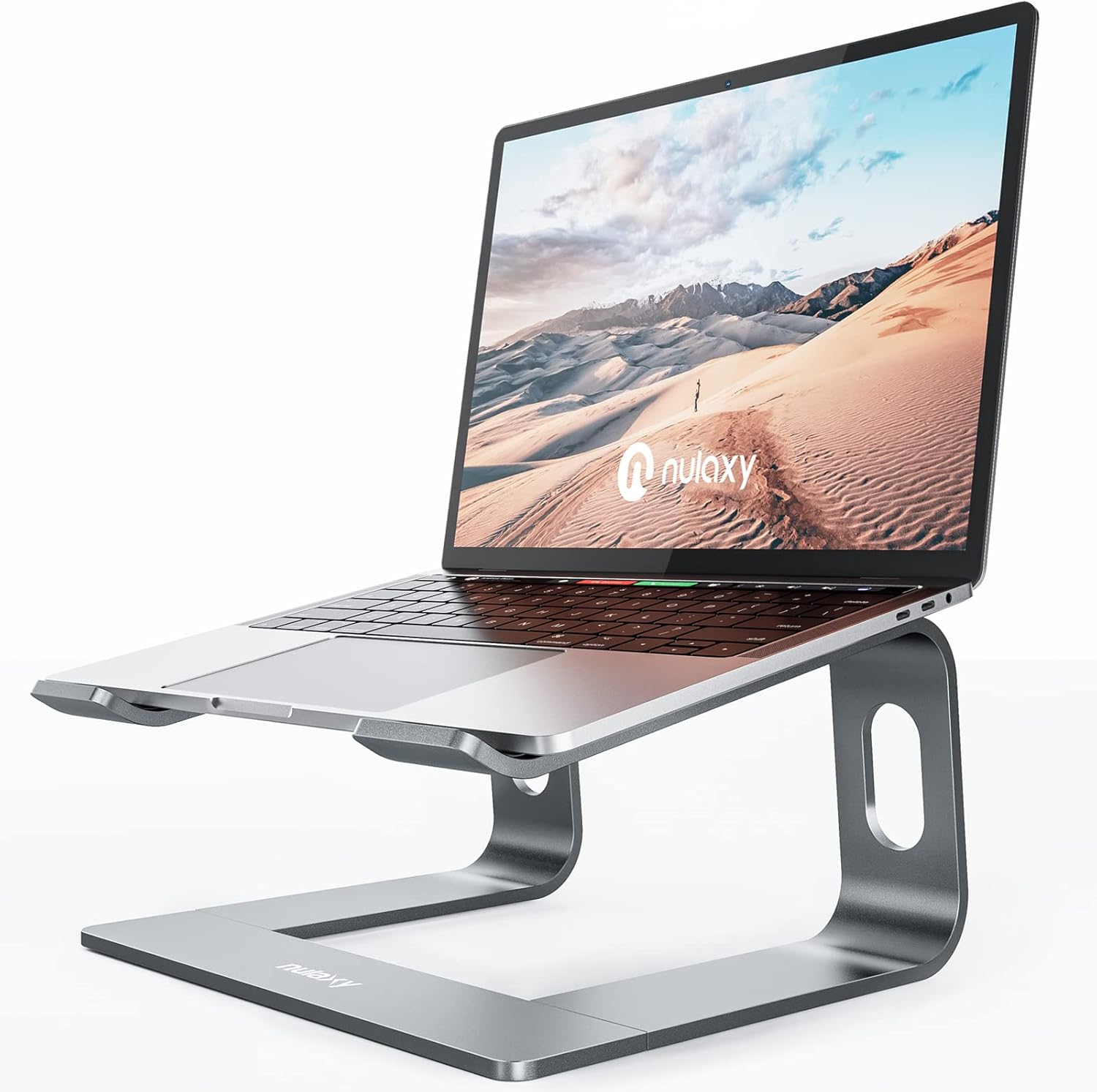
The Nulaxy C3 sits right in the middle of the market. It is not as expensive as the Rain Design, but it offers more features than the Besign. It is the “Goldilocks” option.
Why It Is Popular
Unlike the fixed stands above, the Nulaxy C3 lets you tilt your laptop. This is a very practical feature. If there is a glare on your screen from a window, you can just tilt the laptop slightly to fix it.
It is made of 5mm thick aluminum, which makes it sturdy enough for almost any normal laptop. The open-back design is excellent for keeping your computer cool, as it lets the fans breathe freely.
My Honest Experience
- Design: It looks sharp and modern.
- Comfort: The front lip that holds the laptop is slightly raised. If you type directly on the laptop, this might dig into your wrists. I recommend using an external keyboard with this stand.
Key Specs:
- Material: 5mm Aluminum Alloy.
- Adjustability: Tilt and Angle adjustment.
- Compatibility: 10 to 16-inch laptops.
Pros & Cons
✅ The Good
- Smooth tilt adjustment.
- Great build quality for the price.
- Keeps laptops very cool.
❌ The Bad
- Slightly less stable than the Boyata.
- Front lip can be annoying for wrists.
Advisor Verdict: Excellent if you need to adjust your viewing angle frequently to avoid glare.
5. Amazon Basics Ventilated Stand (The Budget Choice)
Status: Pure Utility.
Ideal For: Maximum airflow and tight budgets.

Let’s be honest: sometimes you just want something cheap that works. The Amazon Basics Ventilated Stand is not going to win any beauty contests, but it is a workhorse.
Why It Is Effective
This stand uses a metal mesh design. Imagine a window screen made of strong metal. Because it is mostly holes, 100% of the air can reach your laptop. If you have an older laptop that gets hot and loud, this is the best stand for you.
It is also adjustable and can handle very large laptops, up to 17.3 inches, which is rare for a budget product.
My Honest Experience
- The Feel: It feels a bit cheaper than the aluminum stands. It is utilitarian.
- The Function: It has a cord organizer on the back which is a nice touch to keep your desk tidy.
Key Specs:
- Material: Metal Mesh.
- Size: Fits huge laptops (up to 17.3″).
- Price: Highly Affordable.
Pros & Cons
✅ The Good
- Very affordable.
- Best airflow for hot laptops.
- Cord organizer included.
❌ The Bad
- Looks industrial (not stylish).
- Can be a bit bouncy when typing.
Advisor Verdict: If you don’t care about looks and just want to keep your hot laptop cool, buy this.

Buying Guide: How to Choose the Right Stand?
You might still be confused. “Riajul, they all look the same!” Let me break it down into three practical factors. Do not ignore these.
1. The “Wobble” Factor (Stability)
This is the most important thing. If you plan to type on your laptop’s keyboard while it is on the stand, you must get a stable stand.
- My Recommendation: The Rain Design mStand or Besign LS03 are the most stable.
- Pro Tip: For the best experience, I always recommend buying a separate wireless keyboard and mouse. This lets you place the laptop screen further away (good for eyes) and keeps your arms in a natural position.
2. Fixed vs. Adjustable
- Fixed Stands (Besign, Rain Design): These are solid pieces of metal. They are stronger and last longer because there are no hinges to break. But, you cannot change the height.
- Adjustable Stands (Boyata, Nulaxy): These allow you to change the height and angle. This is great if you move between different desks or if multiple people use the same stand.
3. Laptop Size and Weight
- Standard Laptops (13-15 inch): Almost any stand on this list will work perfectly.
- Heavy Laptops (17 inch+): Do not buy a cheap foldable stand. It will collapse or shake. You need a “Heavy Duty” option like the Boyata N19.
The Health Check: Why This Matters?
You might think, “It’s just a stand, who cares?” But let’s look at the science for a second.
When your laptop is on the desk, your head tilts forward. The human head weighs about 10-12 pounds. But when you tilt your neck forward by just 15 degrees, the pressure on your spine more than doubles to 27 pounds.
This is why your shoulders burn at the end of the day. A laptop stand is a simple mechanical fix. By raising the screen 6 inches, your head stays upright. It is the cheapest medical insurance you can buy for your back.
Frequently Asked Questions (FAQ)
Q: Will these stands scratch my laptop?
A: No. All the recommended stands (Besign, Nulaxy, Boyata) use silicone rubber pads on the parts that touch your laptop. This prevents metal-on-metal contact.
Q: Do I really need an external keyboard?
A: It is not 100% required, but I highly recommend it. Typing on a laptop that is raised 6 inches in the air is uncomfortable for your wrists (T-Rex arms). For the best ergonomics, keep your keyboard flat on the desk.
Q: Are these stands good for travel?
A: The stands on this list are mostly for your desk. If you travel a lot, I would recommend a foldable stand like the Roost V3 which fits into a backpack. The Besign LS03 can be taken apart, but it is not instant.
Final Verdict: Which One Should You Buy?
Let’s wrap this up with a simple recommendation.
- If you want the best value and a clean setup, buy the Besign LS03. It is the practical choice for 90% of people.
- If you have a heavy laptop or want to stand up sometimes, get the Boyata Adjustable Stand. It is a beast.
- If you love Apple design and want something that lasts forever, get the Rain Design mStand.
Invest in your workspace today. Your future self (and your neck) will thank you.